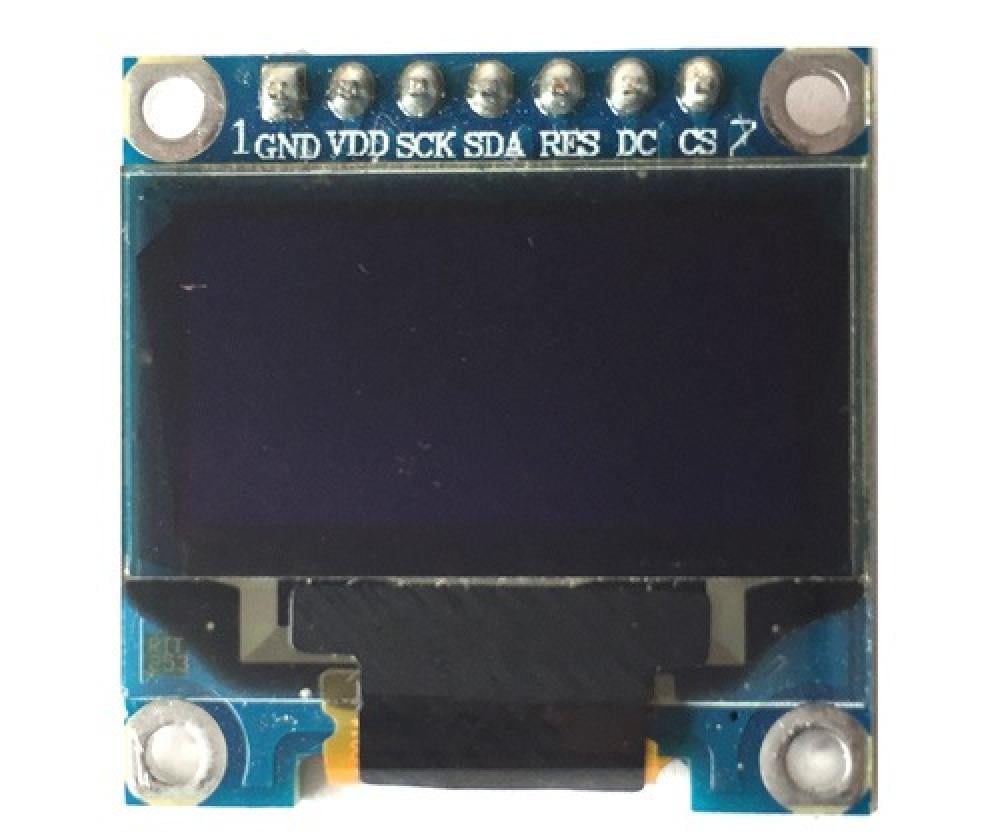
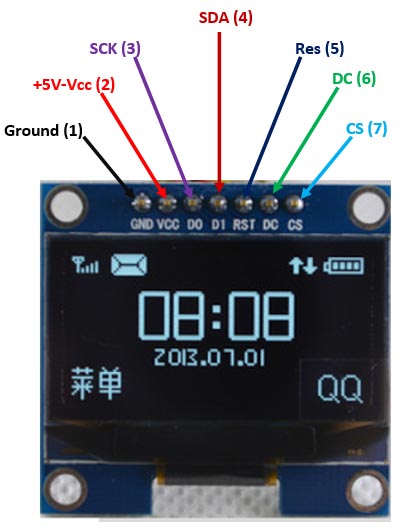
Pin Configuration:
| Pin No: | Pin Name: | Description |
| 1 | Ground (Gnd) | Connected to the ground of the circuit |
| 2 | Supply (Vdd,Vcc,5V) | Can be powered by either 3.3V or 5V |
| 3 | SCK (D0,SCL,CLK) | The display supports both IIC and SPI, for which clock is supplied through this pin |
| 4 | SDA (D1,MOSI) | This is the data pin of the both, it can either be used for IIC or for SPI |
| 5 | RES(RST,RESET) | When held to ground momentarily this pin resets the module |
| 6 | DC (A0) | This is command pin, can either be used for SPI or for IIC |
| 7 | Chip Select (CS) | Normally held low, used only when more than one SPI device is connected to MCU |
Features of OLED Display:
- Monochrome 7-pin SSD1306 0.96” OLED display.
- 128×64 pixel resolution with 160° viewing angle.
- Supply voltage 3V – 5V (supports both 5V and 3.31v logic devices).
- Uses SSD1306 for interfacing hence can communicate through SPI or IIC.
- Multiple SPI or IIC devices are supported
- Can be easily interfaced with Arduino (Library available).
- Supports decent graphics of bitmap images.
- Available in different colors and sizes as discussed below.
Other Types of OLED Display Modules:
| S.No: | Classification | Types |
| 1 | Based on Colour | Monochrome(Blue) |
| Monochrome(White) | ||
| Yellow/Blue Colour | ||
| 2 | Based on number of Pin | 3-Pin (supports only IIC) |
| 7-Pin (supports IIC and SPI) | ||
| 3 | Based on interface IC | SSD1306 |
| SSD1331 | ||
| 4 | Based on size | 0.91” (128×32) |
| 0.96” (128×64) |
Alternative Display Modules:
16×2 LCD Display, Dot Matrix LED Display, 7-Segment LED Display, Nokia 5110 Display, TFT LCD Screen Display
Where to use OLED Displays:
The OLED displays are one of the most attractive displays available for a microcontroller. It has a good view angle and pixel density which makes it reliable for displaying small level graphics. Interfacing this IC with MCU can either be done using IIC or using SPI hence helps to save some pins as well.
So if you are looking for a slim, attractive and efficient display module to make your project look cool with graphics, then this module might be the right choice for you.
How to use OLED Display Module:
As discussed above, there are many types of OLED displays available in the market the most popular one is the Monochrome 7-pin SSD1306 0.96” OLED display which we are discussing here. This display can support both IIC and SPI communication. When you receive the module from the factory it will be in 4-wire SPI mode by default and it is the fastest of all available modes. However, you can re-solder the resistors in different positions to make it work in 3-Wire SPI and IIC protocol also.
Once you have settled on which protocol to use, you should jump into the OLED Display datasheet (given below) to know how to communicate with. The IC supports both 3.3V and 5V logic devices so hardware should not be a problem. If you are planning to interface with Arduino, then all the hard work is already pulled over by the Arduino community by providing you ready-made library. Make sure you have made the connections correctly and used the correct library and you are all set to go.
Applications:
- Used in consumer electronics.
- Used for Smartwatch, mobile phone, and MP3 displays.
- Small level gaming displays.
- Wide range of viewing angle enable to be used in low light.
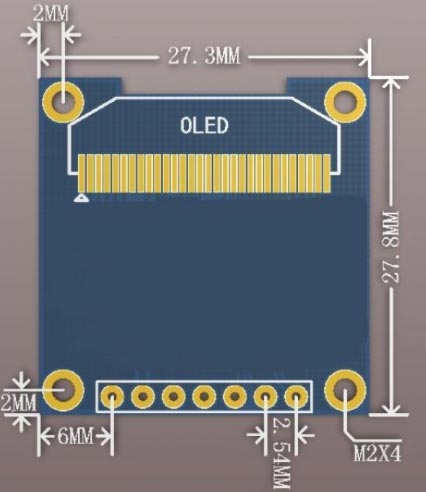
2D-model of Baseboard
When purchased, the SSD1306 OLED display comes with this baseboard. You can use the following dimensional details for you PCB or mounting purposes.